Cxbx Progress

There was some amount of activity in a private branch in the Cxbx project recently..

I have been talking to a developer, Martin, who has spent some of his extra time fiddling with Cxbx. He was able to get some teaser screenshots from Battlestar Galactica. The game displays the menu, and even some in-game. I won’t get into too many details, but here are a couple screenshots.

Battlestar Galactica - menu 2 Battlestar Galactica - menu 3

Battlestar Galactica - in-game (fullscreen) Battlestar Galactica - in-game (windowed)

I have not started to work on Cxbx on a regular basis — but I think this progress is very motivating, and it is tempting me to boot back up my development setup and take another look after a very long absence.

Many thanks to Martin for the contributions and for allowing me to post about his progress. Cheers.

Painless Debug Console

I have had the pleasure of writing a pretty large number of apps for Windows. There are a few things that I have learned, over time, that have really helped to improve my productivity. One of those things is a basic debug console.

Typically, a debug console is handy – go figure – while you’re debugging. Once you have a release quality build, you won’t want the debug console hanging around anymore.

This is one of those snippets of code that, while brutally simple, is rather non-obvious and most people don’t know of.

#ifdef MYAPP_DEBUG_TRACE
if(AllocConsole())
{
    freopen("CONOUT$", "wt", stdout);

    SetConsoleTitle(L"MyApp : Debug Console");

    SetConsoleTextAttribute(GetStdHandle(STD_OUTPUT_HANDLE), FOREGROUND_GREEN | FOREGROUND_BLUE | FOREGROUND_RED);

    printf("n");
    printf(" MyApp Debug Consolen");
    printf("n");
}
#endif

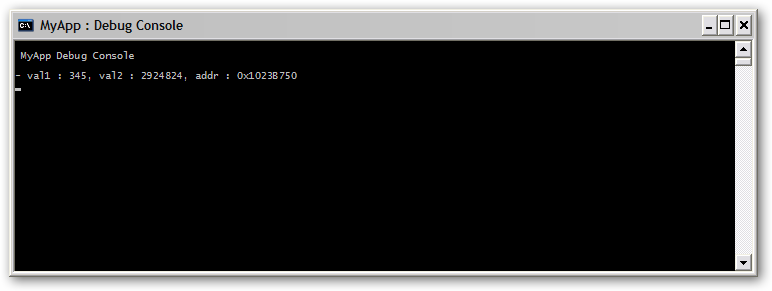
Basically this code, if debug trace preprocessor is set (add MYAPP_DEBUG_TRACE to your preprocessor settings), will allocate a nice little debug console window, change the title, set the font colors, and redirect standard output to the console.

This snippet of code can be added to any Win32 application, and gives you the instant capability to spit out oodles of delicious debugging data. Typically, I combine this method with something along these lines:

#ifdef __cplusplus
inline void null_func(char *format, ...) { }
#define DbgEmpty null_func
#else
#define DbgEmpty { }
#endif
/* Debug Trace Enabled */
#ifdef  MYAPP_DEBUG_TRACE
#include
#define DbgPrintf printf
#else
/* Debug Trace Disabled */
#define DbgPrintf DbgEmpty
#endif

Now, you can use the function “DbgPrintf” just as if it was “printf” – and it will compile away to nothing in a release mode build!

DOS “debug” fun

Sometimes you get the urge to do some programming, but you don’t have access to a compiler. Luckily, virtually every Windows PC in the world has a utility called “debug” installed. This little program lets you input 16-bit x86 assembly language, and allows you to write it out to create a .com file. This file can then be executed inside of a DOS shell.

The following is an example of something simple but cool you can do with this program. I will be using some basic DOS interrupts in order to do console input and output. (Lookup ‘DOS interrupt 21h’ on google to find out more).

I’ll highlight everything i’m typing in green so you can try this at home. You won’t need to type the optional comments (anything after the semicolon is ignored), and they get lost when you write the file anyway.

C:>debug kthx.com

-a 100
1476:0100 mov cl, d7 ; default cl to character 'd7'
1476:0102 mov ah, 6  ; ah:6 is console input/output
1476:0104 mov dl, ff ; dl:ff specifies input
1476:0106 int 21     ; interrupt 21 call
1476:0108 jz 10c     ; skip next instruction if failure
1476:010A mov cl, al ; save result of console input
1476:010C mov dl, cl ; load current character as output
1476:010E int 21     ; interrupt 21 call
1476:0110 jmp 102    ; loop forever!
1476:0112
-r cx
CX 0012
:12
-w
Writing 00012 bytes
-q
C:>

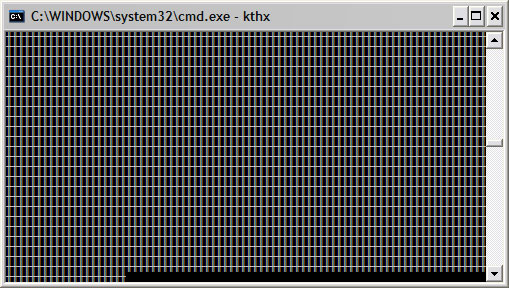
Now, when you execute “kthx.com”, you will see the screen swamped with the funky ‘d7’ ASCII character.

Whenever you type a character, the screen with update to display that character. Try alternating between visible characters and not visible characters (like space). For more fun, try to as quickly as possible type “|/-|/-” (animates like a little progress bar).

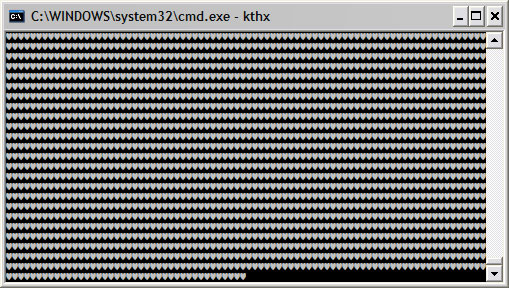
Note that you cant really exit the program. Pressing ctrl+c will actually just display a little heart character. It would be easy to modify the code to accept a character (like escape or control+c) to exit, but i’ll leave that up to you :].

This is just one basic thing you can make a .com file do. For a cooler example, check out neetro. Neetro is a little bit more complex than the program above, so it would have been a pain to write using “debug”. The source is instead compiled using nasm.